
In the realm of Android application development, the debate of universal APK vs split APK is crucial for developers and advanced users alike. Understanding these two formats is essential for optimizing app performance, ensuring device compatibility, and enhancing user experience. This article delves into the differences between universal and split APKs, exploring their advantages, disadvantages, and best use cases.
Understanding APK Formats
What is an APK?
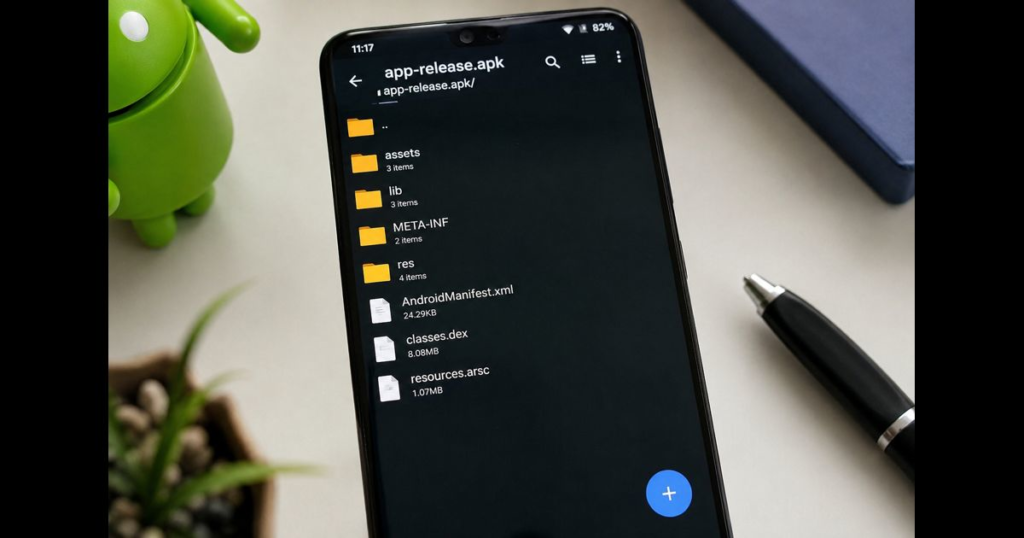
An APK, or Android Package Kit, is the file format used by the Android operating system for the distribution and installation of mobile apps. It contains all the elements that an app needs to install correctly on a device, such as compiled code, resources, and assets.
What is a Universal APK?
A universal APK is a single package that contains all the necessary resources and files for an app to run on any Android device. This format is straightforward and ensures compatibility across a wide range of devices, making it a popular choice for developers who prioritize simplicity and broad device support.
What is a Split APK?
Split APKs, on the other hand, break down the app into multiple APKs, each tailored to specific device configurations such as screen size, processor architecture, and language. This modular approach can lead to smaller download sizes and more efficient resource usage, potentially improving performance on specific devices.
Key Differences Between Universal and Split APKs
Performance Comparison
The performance of an app can be significantly influenced by its APK format. Universal APKs tend to be larger in size, which can lead to longer download times and more storage consumption. However, they offer consistent performance across all devices. In contrast, split APKs can optimize performance by only installing the necessary components for each device, potentially enhancing load times and reducing resource usage.
Compatibility and Device Support
Universal APKs provide broad compatibility, as they include all resources needed for different devices. This makes them an excellent choice for apps targeting a wide audience. Split APKs, while more efficient, require a more sophisticated installation process that considers device-specific configurations, which can sometimes lead to compatibility issues if not handled correctly.
Installation Process Overview
Installing a universal APK is straightforward and requires no additional handling; the user simply downloads and installs the package. Installing split APKs, however, involves downloading multiple files that must be correctly matched to the device configuration. This can complicate the installation process, but modern app stores typically manage this seamlessly.
Storage and Resource Management
Universal APKs, by nature, take up more storage space on a device since they contain all possible configurations. Conversely, split APKs are more storage-efficient, as only the necessary components are installed, reducing the overall footprint on the device.
Pros and Cons of Each Format
Advantages of Universal APKs
- Compatibility: One package works on all devices, simplifying distribution.
- Ease of Use: Simple installation process that users find intuitive.
- Consistent Performance: Delivers the same experience across different devices.
Advantages of Split APKs
- Optimized Performance: Tailored resources can lead to better performance on specific devices.
- Efficient Use of Storage: Smaller APK sizes reduce download times and storage use.
- Scalability: Easier to manage updates and changes for specific device configurations.
Disadvantages and Limitations
- Universal APKs: Larger file sizes and inefficient resource usage can burden devices with limited storage.
- Split APKs: More complex installation process and potential for compatibility issues if not correctly managed.
Practical Applications and Recommendations
When to Opt for Universal APK
Universal APKs are ideal when targeting a diverse user base with varying devices or when simplicity and ease of use are paramount. They are particularly advantageous for developers who want to ensure their app can be easily downloaded and installed without compatibility concerns.
When Split APKs are More Suitable
Split APKs shine in scenarios where performance optimization and efficient resource usage are critical. They are well-suited for apps with large resource files or those targeting specific high-performance devices. Developers who want to tailor experiences to device capabilities while minimizing download sizes should consider split APKs.
Conclusion and Future Trends
The choice between universal APK vs split APK ultimately depends on the specific needs of your app and target audience. As technology progresses, we may see further innovations in APK packaging formats, potentially blending the benefits of both approaches. For now, developers must weigh the trade-offs in compatibility, performance, and user experience to determine the best fit for their applications.
FAQs
- What is the difference between a universal and split APK? Universal APKs contain all resources for all devices in one package, while split APKs break down the app into multiple packages optimized for different configurations.
- How do you install a split APK? Split APKs require a package installer that can handle multiple APK files, such as the Google Play Store or a specialized app installer.
- Are split APKs more efficient? Yes, they can be more efficient in terms of storage and performance as they only install necessary resources specific to the device.
- Can universal APKs run on all devices? Generally, yes. They are designed to work across a wide range of devices without additional configuration.
- What are the security implications of using these APK formats? Both formats are secure when obtained from trusted sources. However, split APKs might require extra care during installation to ensure all components are verified.
As we continue to explore the landscape of Android app development, understanding the nuances of universal APK vs split APK is vital for making informed decisions. Whether you’re a developer aiming for broad compatibility or seeking performance optimization, the right APK format can significantly impact your app’s success.







Leave a Reply