
For those navigating the world of Android development, the term “base APK” frequently appears, yet its significance can be elusive. So, what is base APK on Android? In essence, a base APK is the core application package that serves as the foundation for an Android app. Understanding its function and how it integrates with other APK files is crucial for developers and tech enthusiasts aiming to optimize app performance.
Introduction to APKs
What is an APK?
APK stands for Android Package and represents the file format used by the Android operating system for the distribution and installation of mobile apps. These files contain all the necessary elements for an app to run on a device, including the code, resources, assets, and manifest file.
Importance of APKs in Android
APKs are integral to the Android ecosystem, enabling users to easily download and install apps on their devices. They ensure that all necessary components are packaged together, allowing for a seamless installation experience.
Understanding Base APK
Definition of Base APK
A base APK is the primary APK file that contains the core functionality of an application. It is the central piece in the Android app architecture, with additional APKs, known as split APKs, often used to deliver language packs, screen size adaptations, or optional features.
Role in Android Applications
The base APK serves as the main executable file and is essential for the app’s installation on any Android device. It houses the fundamental code and resources required for the app to function properly, making it a critical component in the app’s lifecycle.
How Base APK Works
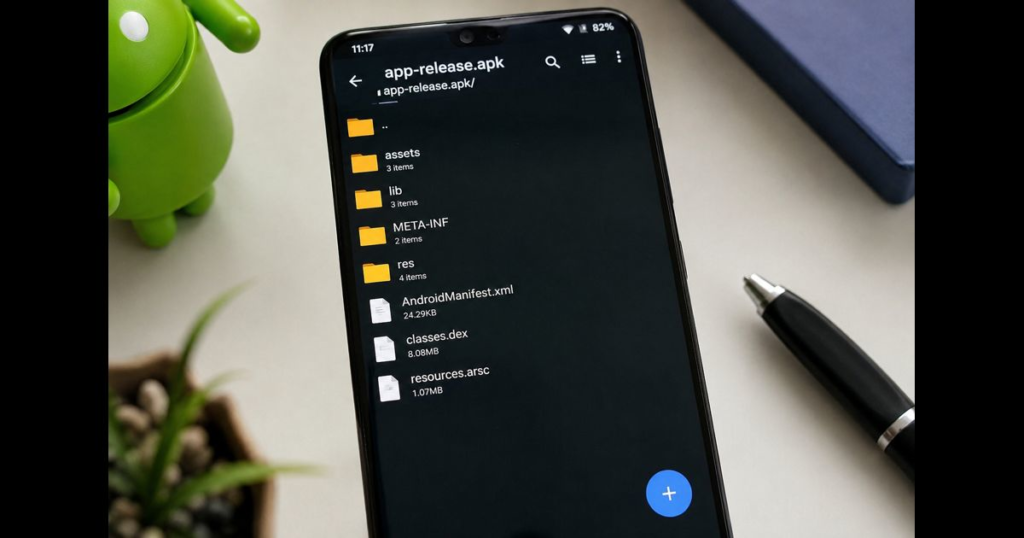
Components of a Base APK
The base APK includes:
- Manifest File: Details the app’s metadata, permissions, and components.
- Dex Files: Contain the compiled code that runs on Android devices.
- Resources: Images, layouts, and other assets used by the app.
- Libs: Compiled code specific to a software library.
Installation Process
When an Android app is installed, the base APK is the first component to be deployed, followed by any split APKs if applicable. This ensures that the core functionality is established before any additional features are added.
Base APK vs. Split APKs
Differences and Use Cases
While the base APK contains the core functionality of an app, split APKs allow developers to modularize their applications. This modular approach helps in reducing the APK size, as users download only the components necessary for their device configuration. Here’s a comparison to illustrate the differences:
| Aspect | Base APK | Split APK |
|---|---|---|
| Content | Core functionalities and resources | Optional features, language packs, and screen size adaptations |
| Installation | Mandatory for app installation | Optional, based on device specifications |
| Size | Typically larger | Smaller, targeted |
Security Implications
Risks of Using Base APKs
Base APKs, like any APK file, can be vulnerable to security risks if sourced from unverified repositories. Malicious actors can tamper with APK files, injecting harmful code. It is crucial to download APKs from reputable sources or verify their integrity through digital signatures.
How to Verify APK Integrity
Verifying the integrity of an APK involves checking its digital signature. This process ensures that the APK has not been altered since it was signed by the developer. Tools like APKMirror or the Android Debug Bridge (ADB) can assist in verifying signatures.
Practical Applications and Examples
Base APKs are utilized in diverse applications, from simple mobile games to complex enterprise solutions. For instance, a social media app might use a base APK to deliver its core functionalities, while separate split APKs manage different language interfaces. This modular approach not only optimizes app size but also enhances user experience by providing tailored content.
History and Evolution of APKs
The Android Package format has evolved significantly since its inception. Initially, APKs were monolithic, containing all resources and code within a single file. However, with the introduction of split APKs and app bundles, developers can now create more efficient and flexible applications. These advancements have allowed developers to optimize app delivery and improve user engagement by offering personalized experiences.
Frequently Asked Questions
- What is the purpose of a base APK? The base APK provides the essential code and resources necessary for an Android app to function.
- How do I install a base APK on Android? Installation can be done via the Google Play Store or by sideloading via ADB, provided the APK is verified.
- Are base APKs safe to use? Yes, when sourced from reputable developers and verified through digital signatures.
- What’s the difference between an APK and a base APK? An APK can refer to any Android package file, while a base APK specifically refers to the core file of an application.
- Can a base APK work without split APKs? Yes, it can operate independently, though split APKs enhance functionality by adding specific features.
In the dynamic field of Android development, understanding the role and significance of a base APK is vital. This knowledge not only aids in developing robust applications but also ensures they are secure and optimized for diverse user needs. As the Android ecosystem continues to evolve, staying informed about these fundamental components will empower developers to create innovative and efficient applications.









Leave a Reply