
An APK downloaded as a ZIP file on Android does not always need to be converted. In fact, a normal ZIP archive cannot be turned into a working Android application simply by changing its extension.
Renaming can help only when the downloaded file was already a valid APK and .zip was added to its filename incorrectly. If the ZIP contains an APK as a separate file, the correct action is to extract that APK. If it contains documents, images, source code, or unrelated files, renaming it will not create an installable application.
The first step is therefore to identify what was actually downloaded.
Why an APK May Appear as a ZIP File
An APK is an Android application package. Android’s official documentation describes it as an archive containing the code and resources an app needs at runtime.
APK files use a ZIP-based container internally. Because of this shared structure, some file managers or archive utilities may recognize an APK as a compressed archive even when its filename ends in .apk.
A download may also appear as a ZIP when:
- The filename ends in .apk.zip
- A website supplies an incorrect filename
- The server sends unsuitable file-type information
- A browser or download manager modifies the extension
- The download is an archive containing one or more APK components
- The file is genuinely a ZIP package rather than an Android application
These situations require different solutions. Renaming every ZIP file to APK is not a reliable or safe approach.
Check the Complete Filename First
Android file managers sometimes shorten long names or make extensions difficult to notice. Inspect the complete filename before changing anything.
Common examples include:
- application.apk
- application.apk.zip
- application.zip
- application.xapk
- application.apks
- application.apkm
A file ending in .apk.zip may be a valid APK with an extra extension, but the filename alone is not proof. A file ending only in .zip may contain an APK, multiple files, or no Android application at all.
Use the built-in file manager supplied with the device or another current, reputable file-management tool to view the file’s full name and contents. A discontinued utility is not required for this process.
Identify Which Type of Download You Have
Before renaming or extracting the file, determine which of the following situations applies.
The File Is a Valid APK With the Wrong Extension
The download may originally have been an APK but received .zip as an additional or replacement extension.
Clues may include:
- The source identified the download as a single APK
- The expected filename ended in .apk
- The current filename ends in .apk.zip
- The archive contains typical Android package components
- The file size matches the publisher’s documented download
In this limited situation, restoring the .apk extension may allow Android to recognize the package correctly.
Renaming does not convert the file. It only corrects the filename of a package that was already an APK.
The ZIP Contains an APK File
Some developers or distributors place an APK inside a ZIP archive alongside release notes, documentation, or other files.
Open the ZIP without installing anything and inspect its contents. If it contains a clearly identified .apk file, extract that file to a normal folder. The extracted APK can then be evaluated separately.
Do not rename the outer ZIP when the actual APK is stored inside it.
The Download Is a Split Package
Not every Android download is distributed as one APK. Files ending in .apks, .apkm, or .xapk may contain a base APK and additional configuration or resource packages.
These APK file formats are not ordinary standalone APKs. Changing their extension to .apk does not combine their components or make them directly installable.
Use the distribution method documented by the application’s legitimate publisher. If the package format or required installation process is unclear, obtain a standard release through an official source instead of experimenting with renamed files.
The ZIP Contains Source Code or Project Files
A ZIP archive may contain an Android Studio project, source code, images, configuration files, or other development materials.
This archive cannot be converted into a functioning APK by renaming it. Source code must be compiled, configured, and signed through an Android development process before it becomes an installable application.
Building an app requires the correct project structure, dependencies, software-development tools, and signing configuration. It is not a file-extension conversion.
The ZIP Contains Unrelated Files
If the archive contains ordinary documents, media, backups, or miscellaneous folders, it is not an Android application package.
Changing .zip to .apk will only give the archive a misleading filename. Android will still be unable to install it because the required application structure is absent.
When Renaming the File Is Appropriate
Rename the file only when there is reasonable evidence that it was originally a valid APK and its extension was changed incorrectly.
Using the device’s built-in file manager:
- Open the Downloads folder.
- Locate the affected file.
- View its complete filename and details.
- Confirm that it was expected to be a single APK.
- Rename only the final extension from .zip to .apk.
- Save the new filename.
- Recheck the file details before attempting installation.
For example:
application.apk.zip → application.apk
Do not alter the base filename, extract random components, or add multiple extensions.
If the file manager warns that changing the extension may make the file unusable, consider that warning carefully. Proceed only when correcting a clearly mislabeled APK.
When Renaming Will Not Work
Changing .zip to .apk will not repair:
- An incomplete download
- A corrupted file
- An ordinary ZIP archive
- Source code that has not been compiled
- A package built for an unsupported device
- Missing split-APK components
- An unsigned or invalid Android package
- An app signed differently from an installed version
- A file containing unrelated data
- A deliberately misleading download
Renaming changes only the filename. It does not modify the internal structure, compile application code, restore missing information, repair corruption, or create a valid signature.
Online “ZIP to APK converters” cannot legitimately transform an arbitrary archive into a functional Android app. Uploading an unknown file to such a service can also expose private or sensitive contents.
How to Inspect the Archive Carefully
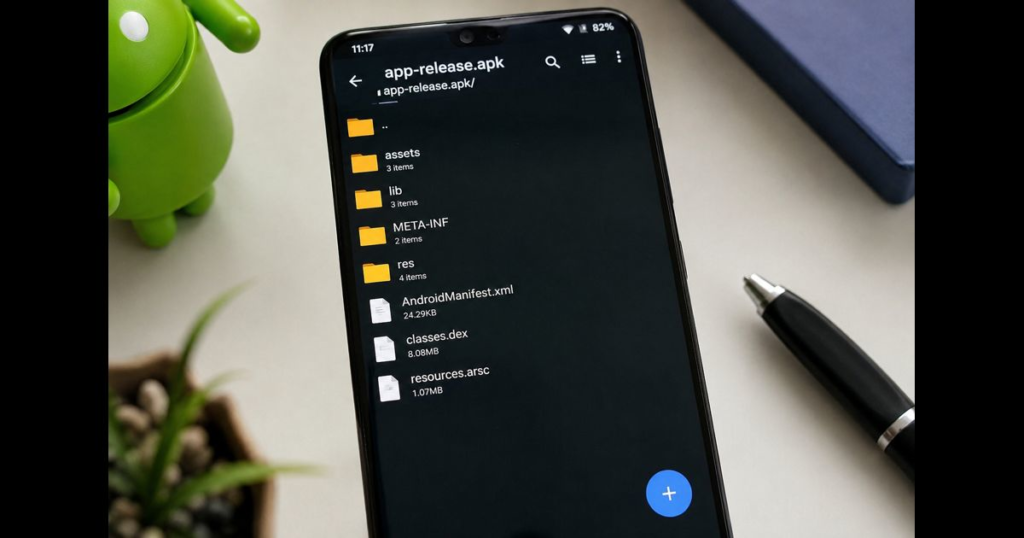
An APK normally contains Android-specific components. Depending on how the package was built, these may include:
- AndroidManifest.xml
- One or more classes.dex files
- A resources.arsc file
- A res directory
- A lib directory
- A META-INF directory
Seeing these names can support the possibility that the file is an Android package, but it does not establish authenticity or safety. A misleading archive can imitate expected filenames.
Inspection should be combined with information about the developer, source, expected version, checksum, and signing certificate.
If the ZIP contains another .apk file rather than these components at its top level, extract the APK instead of renaming the outer archive.
Verify the Download Before Installation
A corrected extension does not make a file trustworthy. Verification should occur before any installation permission is granted.
Confirm the Source
Check whether the file came from the actual developer or an authorized distribution channel. Compare the developer name, application ID, version, and official website where possible.
A familiar icon or filename is not enough to confirm origin.
Compare the File Size
A substantially smaller file may indicate an incomplete download, while an unexpectedly large file may contain additional material. File size alone does not verify authenticity, but a major difference from the documented release deserves investigation.
Check the Checksum
A SHA-256 checksum creates a fingerprint for the downloaded file. It can confirm that the file matches a reference copy when the expected checksum is supplied through a dependable channel.
A checksum displayed beside the same unverified download provides limited assurance. The reference value must come from a source connected to the legitimate publisher.
Review the Signature
An APK signature helps identify signing continuity between releases. This is particularly important when the file is intended to update an app already installed on the device.
Android requires APKs to be digitally signed, but a signature alone does not prove that the developer is legitimate or that the application is harmless.
Keep Play Protect Enabled
Google recommends obtaining Android apps from Google Play when possible and warns that software from unknown sources can put a device and personal information at risk. Google Play Protect can examine applications for potentially harmful behavior.
Do not disable security protections merely because a renamed file fails to install.
What to Do If the Renamed APK Will Not Install
A failed installation indicates that the problem was not limited to the filename or that another requirement has not been met.
Download the File Again
An interrupted connection can produce an incomplete package. Delete the failed copy and obtain a fresh file from the legitimate source.
Do not repeatedly rename or extract an incomplete download.
Check for a Parsing Error
A package parsing error can occur when Android cannot read the package correctly. Possible causes include corruption, an unsupported Android version, an invalid manifest, or an incomplete file.
Confirm Device Compatibility
A compatibility issue may result from the Android version, processor architecture, required hardware, regional availability, or missing package components.
Renaming cannot make an incompatible app compatible.
Look for a Signature Conflict
If another version of the app is already installed, Android may reject the new package when its signing certificate does not match the existing installation.
Avoid uninstalling an existing app until important data is backed up and the identity of the replacement package has been confirmed.
Check Whether It Is a Complete Package
Split APK distributions require all necessary components. A base APK extracted without its configuration packages may not install or function correctly.
Return to the publisher’s documented distribution method rather than trying to merge or rename components manually.
Installation Permission Is Not a File Repair
Android may require permission for a browser or file manager to install an application obtained outside a first-party app store. This permission applies to the source initiating the installation.
Granting it does not:
- Convert a ZIP into an APK
- Repair a damaged package
- Confirm that the developer is legitimate
- Make an incompatible app work
- Remove malicious code
- Resolve a signature conflict
Evaluate the file first. Installation permission should be considered only after its source, format, version, and purpose have been established.
If temporary permission is granted to a specific source, it can be disabled again after the installation attempt.
Common Mistakes to Avoid
Renaming Every ZIP File
Only an APK that was mislabeled can be corrected through renaming. An ordinary ZIP remains an ordinary archive regardless of its extension.
Extracting the Contents of an APK
Because APKs use a ZIP-based structure, an archive utility may open them. Extracting the internal components does not produce an installable app. Android expects the complete package.
Using a Conversion Website
A generic converter cannot compile arbitrary files into a legitimate Android application. Avoid uploading unknown archives, especially when they may contain personal or proprietary information.
Ignoring the Original Extension
Files such as .apks, .apkm, and .xapk may contain multiple components. Renaming them can hide their actual format without solving the installation requirement.
Bypassing Android Warnings
A warning may indicate an unrecognized source, invalid package, incompatible version, harmful behavior, or another security concern. Determine the cause rather than treating the warning as an obstacle to bypass.
Frequently Asked Questions
Can a normal ZIP file be converted into an APK?
No. A normal ZIP archive cannot become an Android application through renaming or basic extraction. Creating an APK from source materials requires a proper Android build and signing process.
Why does an APK look like a ZIP archive?
APK files use a ZIP-based archive structure. Some file managers identify that internal structure and offer to open open the package as an archive.
When should .zip be renamed to .apk?
Only when the file was originally a valid APK and its extension was changed or appended incorrectly. The source, expected filename, internal structure, and file details should support that conclusion.
What if the ZIP contains an APK?
Extract the .apk file from the archive and evaluate it separately. Do not rename the outer ZIP.
Can RAR or another archive app convert ZIP files to APKs?
No. Archive applications can rename, open, compress, and extract files. They cannot transform ordinary content into a compiled and signed Android application.
Is ES File Explorer required?
No. The device’s built-in file manager is normally sufficient for viewing filenames, renaming a mislabeled file, or extracting an APK from a ZIP. There is no need to recommend an outdated file manager for this task.
Why does the APK still fail after renaming?
The file may be corrupt, incomplete, incompatible, unsigned, incorrectly packaged, or part of a split distribution. The original download may also have been an ordinary ZIP rather than an APK.
Is changing the extension safe?
Changing a filename does not alter the code inside the file or establish its safety. Verify the source, version, checksum, signature, and compatibility before considering installation.
Final Assessment
An APK downloaded as a ZIP file on Android should be identified before it is renamed, extracted, or installed.
There are three main outcomes:
- A genuine APK with an incorrect extension may work after the filename is corrected.
- A ZIP containing an APK should be opened so the actual APK can be extracted.
- A normal ZIP archive cannot be converted into an Android application by renaming it.
This distinction prevents wasted troubleshooting and reduces the risk of disguising an invalid or unrelated file as an APK. File extensions describe how software should interpret a file; they do not create the internal structure, code, resources, and signing information required by Android.








Leave a Reply